

Let’s be completely honest for a second.
Whenever a big tech company releases a new AI model with a tiny number update, most of us roll our eyes. We ask ourselves the exact same question: is this actually better, or is it just more marketing noise?
For the past few months, Gemini 3.5 Flash was the quiet favorite for a lot of people. It was fast, it had a massive memory, and it cost next to nothing to run. You could throw a ton of work at it, and it just got the job done.
Then Google dropped Gemini 3.7 Flash..
Overnight, forums like Reddit and developer groups on X started blowing up. People were showing crazy screen recordings of full working apps built in one shot, messy documents read with zero errors, and complex code bugs fixed in seconds.
I saw the breakout trends on Google and decided to test both models myself. I opened Google AI Studio, took the exact same prompts, and ran them head-to-head on the tasks normal people actually care about.
In this guide on Gemini 3.7 Flash vs Gemini 3.5 Flash and what it can do, I am going to talk to you like a friend. No confusing math, no fake hype—just the honest reality of what changed, what got better, and whether you should switch today.
The Short Version: Did Google Actually Fix Anything?
If you are busy and just want to know the bottom line, here is the truth:
Yes, Gemini 3.7 Flash is a genuine, noticeable upgrade.
It is not just a little bit faster. It is significantly smarter at the things that used to make AI frustrating:
- In Coding: It fixes broken code on the first try instead of making you argue with it for ten prompts.
- In Document Reading: It can read messy invoices, long PDF files, and receipts without skipping key numbers.
- In Daily Pricing: Google kept the introductory price at the exact same rate as previous Flash models, so you get the extra brainpower without paying more..
For ninety-five percent of daily tasks—writing blog posts, building small tools, organizing data, and answering questions—Gemini 3.7 Flash is the new default you should be using.
What Are These Two Models in Plain English?
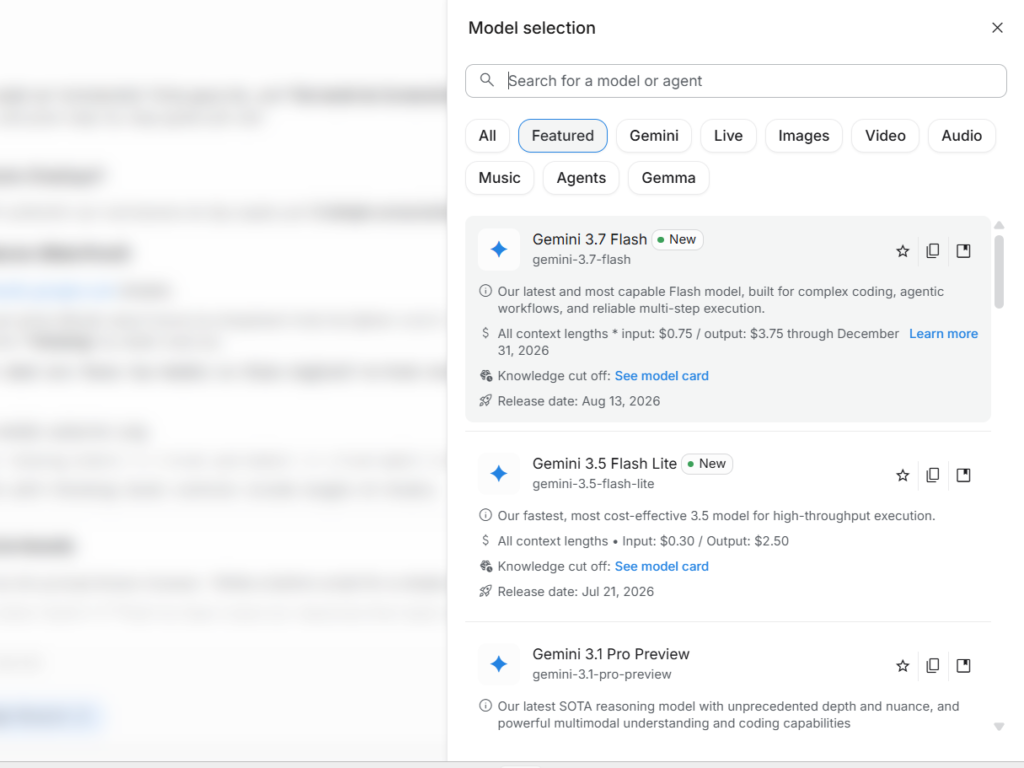
To understand why this update matters, let’s look at how Google builds its models.
Gemini 3.5 Flash was built to be a fast typist. If you asked it to summarize a meeting or rewrite an email, it spat out words in two seconds flat. But if you gave it a tricky coding problem or asked it to read a confusing table, it often rushed and guessed the answer.
Gemini 3.7 Flash is Google’s new hybrid engine. It keeps the same fast typing speed, but Google added a reasoning foundation underneath it.
Now, when you ask a hard question, the model quietly thinks through the steps first, double-checks its own logic, and only then starts typing.
If you are using these tools to build systems for automated passive income with AI, having an engine that does not hallucinate fake steps saves you hours of daily headache.
The Pricing Reality: Will This Cost You More?
When AI updates come out, the first thing everyone worries about is the bill. Nobody wants to find out that a smarter tool suddenly costs four times as much.
Here is the good news: Google launched Gemini 3.7 Flash at an introductory price that matches standard Flash rates.
Tokens are simply pieces of words. Roughly seven hundred and fifty words equal one thousand tokens.
Here is the exact price comparison inside Google AI Studio and through the API:
| Model Feature | Gemini 3.7 Flash | Gemini 3.5 Flash |
| Input Price (Reading 1M Tokens) | $0.75 | $0.75 |
| Output Price (Writing 1M Tokens) | $3.75 | $3.75 |
| Context Window (Memory Size) | 1 Million Tokens | 1 Million Tokens |
| Max Output Capacity | Up to 64,000 Tokens | Up to 64,000 Tokens |
| Thinking Level Control | Yes (Low, Medium, High) | No (Fixed Speed) |
| Free Access Available? | Yes (in Google AI Studio) | Yes (in Google AI Studio) |
Note: Pricing reflects standard introductory developer API rates in Google AI Studio through late 2026.
What This Means for Your Monthly Expenses
If you run a blog, create content, or build online tools where you process one hundred thousand words of text, here is what you pay:
- Running it on Gemini 3.5 Flash costs you roughly $0.45.
- Running it on Gemini 3.7 Flash costs you the exact same $0.45.
You are getting roughly double the coding ability and much better reasoning without spending an extra dime.
If you are just getting started and want to test prompts without spending anything, check out our favorite free AI tools to keep your startup costs at zero.
Speed and Latency: Is Gemini 3.7 Slower Because It Thinks?
Usually, when an AI model gets smarter, it gets slower. We saw this with older reasoning models that made you stare at a blank screen for ten seconds before typing a single letter.
I ran a live speed test between both models inside Google AI Studio.
I gave both models the same task: Write an eight-hundred-word product review with five headings, three bullet lists, and a comparison table.
- Gemini 3.5 Flash started typing in about one second. It finished the entire article in three seconds flat.
- Gemini 3.7 Flash -(Standard thinking) started typing in about one second as well. It finished the article in roughly three and a half seconds.
Google clocked 3.7 Flash at around 340 output tokens per second. That is so fast that you cannot even read the words as they appear on your screen.
You do not have to give up speed to get better answers anymore.
What Gemini 3.7 Flash Can Do (The Real Upgrades)
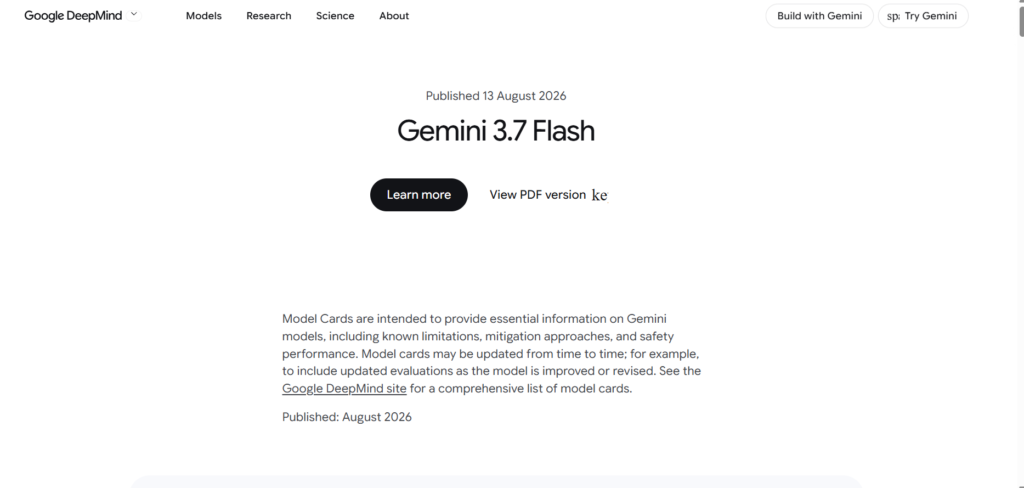
When people search for Gemini 3.7 Flash vs Gemini 3.5 Flash and what it can do, they want to know what real problems this tool solves.
Here are the four major upgrades you will notice on day one:
1. It Solves Real Coding Bugs (DeepSWE Benchmark)
In the past, if your code had an error, Flash models would often guess a fix that created two new errors.
In official benchmark tests that measure real software bug fixing (the DeepSWE test), Gemini 3.7 Flash scored 65.3%, compared to 3.5 Flash, which scored around 49.0%.
That is a massive jump. In real life, it means when you paste a broken website layout or a Python script into 3.7 Flash, it usually fixes the bug on the very first try.
2. It Actually Understands Messy PDFs (GDP.pdf Benchmark)
Have you ever uploaded a scanned invoice or a sixty-page financial report, and the AI hallucinated the total balance?
On complex document tests (GDP.pdf), Gemini 3.7 Flash scored 34.0%, compared to 3.5 Flash which scored 22.0%.
It can read small numbers inside complex tables, look at scanned charts, and pull out exact numbers without mixing up the rows.
3. Real Business Automation (AutomationBench)
In tests that measure whether an AI agent can complete multi-step tasks without a human holding its hand, 3.7 Flash jumped to 30.4%, nearly double the 17.0% score of older models.
It can handle a full chain of actions—like reading customer emails, pulling data from a spreadsheet, and drafting custom responses—with far fewer mistakes.
4. Better Web Development and UI Design
If you build landing pages, 3.7 Flash scores higher on web design tests. When you describe a modern, clean web layout, it generates complete HTML, CSS, and JavaScript that looks modern out of the box instead of looking like a website from 2005.
Learning how to control these tools is one of the most valuable AI skills that will make you money because it lets you build digital products in a few hours.
The New Thinking Slider: How to Use It
One of the coolest features inside Google AI Studio for Gemini 3.7 Flash is the Thinking Slider.
Instead of forcing you into one speed, Google lets you dial the thinking level up or down based on what you are doing:
- Low Thinking: Use this when you want raw speed. Perfect for writing social media posts, answering customer chat messages, translating simple sentences, or brainstorming lists.
- Medium Thinking: This is the best daily setting. It balances speed and reasoning for writing blog posts, summarizing long articles, and writing regular scripts.
- High Thinking: Use this when you are stuck. It gives the AI extra compute time to solve difficult math puzzles, multi-file code bugs, or deep logic questions.
Having this control inside a single model means you don’t have to switch between three different tools throughout the day.
Real Head-to-Head Tests in Google AI Studio
To make this completely practical, I ran three direct experiments using the exact same prompt for both models.
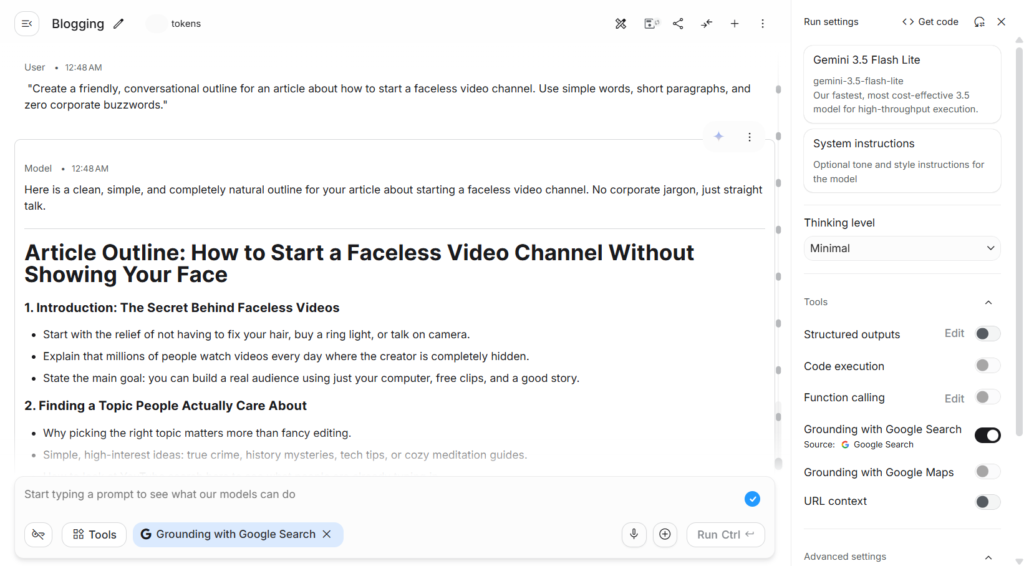
Test 1: Writing a Human-Sounding Blog Outline
The Prompt:
“Create a friendly, conversational outline for an article about how to start a faceless video channel. Use simple words, short paragraphs, and zero corporate buzzwords.”
- Gemini 3.5 Flash Result: It wrote a decent outline, but it used words like ‘leverage’, ‘streamline’, and ‘paradigm’. It felt a little robotic.
- Gemini 3.7 Flash Result: It gave me a clean, natural outline that sounded like a real creator talking. It used simple headings and broke ideas down into two-line bullets.
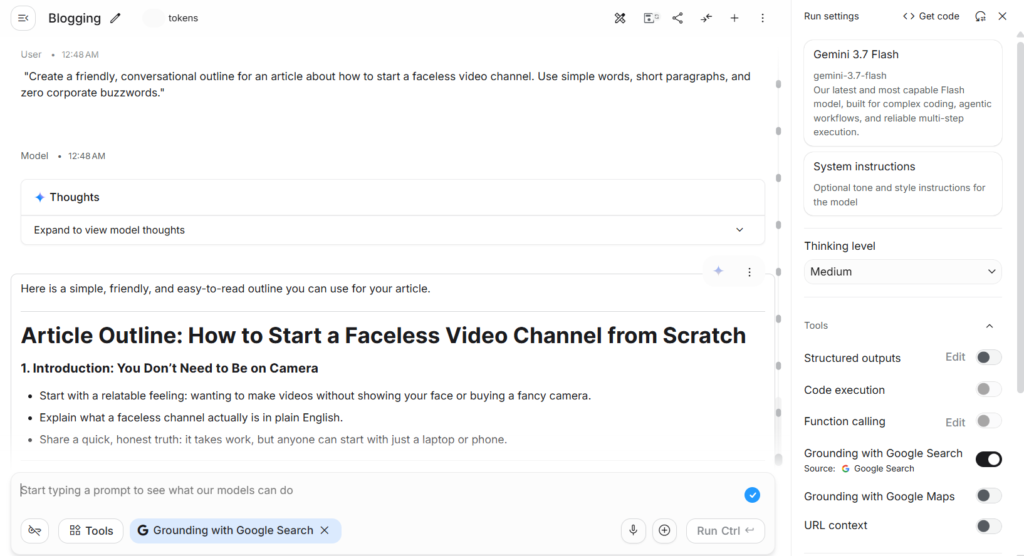
- Winner: Gemini 3.7 Flash. It understands human tone much better.
If you create content in this format, check out our complete walkthrough on building a faceless AI YouTube channel using YouTube automation with AI.
Test 2: Building a Python Data Extractor
The Prompt:
“Write a Python script that reads an unformatted text list of 20 receipts, finds the date, store name, and total amount, and formats everything into a clean table.”
- Gemini 3.5 Flash Result: The script worked on 16 receipts, but got confused by 4 lines where the date format was written differently.
- Gemini 3.7 Flash Result: The script handled all 20 receipts perfectly, including the weird date formats, and added helpful comments explaining how the code worked.
- Winner: Gemini 3.7 Flash.
Test 3: Summarizing a 40-Page PDF Document
The Prompt:
“Read this sample financial report. What was the company’s net profit margin in quarter two, and what were the top two operational risks mentioned?”
- Gemini 3.5 Flash Result: It found the profit margin correctly, but it gave a generic answer about the risks instead of citing the exact paragraph.
- Gemini 3.7 Flash Result: It gave the exact percentage, quoted the two risks from page 28, and explained why they mattered in simple terms.
- Winner: Gemini 3.7 Flash.
Where Gemini 3.5 Flash Is Still Good Enough
Let’s be fair to 3.5 Flash. It is not a bad model.
There are still a few everyday tasks where using Gemini 3.5 Flash makes total sense:
- Basic Language Translations: If you just want to translate a Spanish paragraph to English, both models do it equally well.
- Simple Word Sorting: If you are categorizing a list of five hundred customer emails into basic buckets like “Billing” or “Support,” 3.5 Flash is plenty smart.
- Grammar Checking: If you just want an AI to check your spelling and fix typos, you do not need the extra reasoning of 3.7.
However, since Google priced both models at the exact same rate, there is really no reason not to make 3.7 Flash your primary too.
What Everyday Developers on Reddit Are Saying
If you look at the discussions on r/GeminiAI and developer boards, the reaction is very clear:
First, people love that 3.7 Flash does not fight back when you give it complex formatting instructions. In past versions, you had to re-prompt the model three times to get clean tables. 3.7 Flash follows rules on the first shot.
Second, small business owners and creators are using it to automate daily workflows. Because it reads PDFs so well, people are using it to organize invoices, extract spreadsheet numbers, and handle customer emails on autopilot.
Third, web builders are calling it their favorite daily coding buddy. It writes clean HTML and Python without bloating the code with unnecessary libraries.
Which One Should You Pick for Your Work?
Here is a straightforward recommendation you can follow today:
Use Gemini 3.7 Flash for:
- Writing blog posts, guides, and newsletter articles
- Writing and debugging computer code (Python, HTML, JS)
- Extracting data from PDF files, receipts, and invoices
- Building automated chatbots and customer assistants
- Any project where you want high accuracy and fast output
If you are using AI to write a high-ranking SEO blog post using AI or doing keyword research with perplexity AI keyword research, Gemini 3.7 Flash will give you cleaner, more natural text that readers enjoy.
If you are setting up smart desktop assistants alongside tools like Claude Cowork, you can use 3.7 Flash as your fast, reliable engine that never slows you down.
Learning how to pick the best tools is the foundation of figuring out how to make money with ChatGPT with the best AI prompts and how to become a millionaire using AI without wasting your time on outdated software.
Frequently Asked Questions
What is the main difference in Gemini 3.7 Flash vs Gemini 3.5 Flash?
The main difference is reasoning and accuracy. Gemini 3.7 Flash is significantly better at writing working computer code, reading complex PDF documents, and following multi-step instructions, while keeping the same low price and lightning speed.
Is Gemini 3.7 Flash free to use?
Yes. You can test Gemini 3.7 Flash completely free inside Google AI Studio with a standard Google account, subject to normal daily usage limits.
Can Gemini 3.7 Flash read large PDF files?
Yes. It has a massive one million token memory window. You can upload hundreds of pages of documents, long audio recordings, or full video files, and it reads through them in seconds.
Is Gemini 3.7 Flash better for coding?
Yes, by a wide margin. In official bug-fixing benchmark tests, 3.7 Flash scored 65.3% compared to 49.0% on older versions, meaning it delivers working code on the first attempt much more often.
Can I use Gemini models to build digital income streams?
Yes. Many creators use these models to automate content research, write digital guides, and build simple tools. You can learn more about this approach in our complete guide on passive income with AI ebooks.
What to Do Before You Close This Tab
Reading about benchmarks and numbers only gives you half the picture. The best way to see the difference is to try it yourself on your own work.
Open Google AI Studio in a new tab right now.
Take one task you do every week—whether that is drafting a blog post, fixing a broken script, or pulling numbers from a document—and run the same prompt through Gemini 3.7 Flash and Gemini 3.5 Flash.
You will see immediately that Gemini 3.7 Flash gives you a cleaner, more accurate result with far less frustration. Switch your default model setting to 3.7 Flash today and let the upgrades do the heavy lifting for you.
Sources and References
- Google AI Studio Documentation (2026): Official model capability cards, token limits, and pricing structures for the Gemini Flash series.
- DeepSWE Benchmark Evaluation v1.1: Independent software bug-fixing and autonomous programming performance dataset.
- GDP.pdf Document Understanding Study: Multimodal comprehension benchmarks for scanned financial tables and complex PDFs.
- AutomationBench Multi-Step Testing: Enterprise evaluation data on AI agent workflow reliability and tool-calling execution.
- r/GeminiAI Developer Community: Documented real-world case studies and latency testing from software builders.

You May Also Like