
Keyword Generator
Enter a topic and generate 20 focused keyword ideas for your content.
Your keywords will appear here
Enter a topic above and click Generate Keywords to get started.
AI Keyword Generator: Find Better Keywords for Your Content
Ever sit down to write a blog post and then realize you have no idea what people are actually searching for?
That happens more often than you might think. You may have a good topic in mind, but finding the right words to target can take a lot of time. That’s where keyword research comes in. A keyword is simply a word or phrase someone types into Google when they’re looking for an answer, product, idea, or solution.
And if you’re creating YouTube content too, keyword research can help there as well. Once you find a topic people are interested in, you can use our AI YouTube Title Generator to turn that topic into title ideas for your video.
But before we get into how our AI Keyword Generator works, let’s make sure we understand what keywords actually are.
What Is a Keyword?
A keyword is a word or phrase people type into a search engine when they want to find something. It could be a simple phrase like “AI tools” or something more specific, like “best AI tools for college students.” Both are keywords, even though they are very different.
This is important for bloggers because your readers are already using certain words to find information. If you know what those words are, you have a much better starting point when planning your content. Instead of guessing what people might want to read, you can use their searches to guide your ideas.
For example, let’s say you want to write about making money with AI. You could simply target “make money with AI,” but that’s only one possible search. People might also search for “how to make money with AI,” “AI side hustles,” “best AI tools for making money,” or “AI jobs for beginners.” Suddenly, one topic gives you several possible directions.
Why Do Keywords Matter for SEO?
Here’s the simple reason: keywords help you understand what people are looking for.
Imagine spending a few hours writing an excellent article, only to find out later that you picked a topic nobody is searching for. The article might still be useful, but getting people to find it can be much harder. Keyword research gives you some direction before you start writing.
That doesn’t mean you should stuff your article with the same keyword again and again. Google itself says you should think about the words people might use to find your content, while making your pages useful for readers. You can learn more about this in Google’s SEO Starter Guide.
So, think of keywords as a way to understand your audience, not as a trick to force your page into search results.
The Main Types of Keywords
You’ll come across a lot of SEO terms when you start learning about keyword research. Don’t worry, you don’t need to memorize all of them. A few basic types are enough to get started.
Primary Keywords
Your primary keyword is the main phrase your page is about. If you’re writing an article about an AI keyword tool, for example, “AI keyword generator” could be your main keyword.
It gives your article a clear focus. You can then use related phrases throughout the article where they make sense instead of trying to make every section about a different keyword.
Long-Tail Keywords
Long-tail keywords are usually longer and more specific phrases. For example, “free AI keyword generator for blog posts” is much more specific than simply “keyword generator.”
These keywords can be useful because they tell you more about what the person is looking for. Someone searching for a free keyword generator for blog posts already knows what they need, so the search has a much clearer purpose.
Question Keywords
Question keywords are exactly what they sound like. They’re searches written as questions, such as “how do I find keywords for my blog?” or “what are long-tail keywords?”
These can be especially useful when you’re planning guides, tutorials, or FAQ sections. If people are asking a question, there’s a good chance they want a clear answer.
Related Keywords
Related keywords are phrases that connect to your main topic. If your main keyword is AI keyword generator, related terms might include SEO keyword research, long-tail keywords, search intent, blog keywords, and content ideas.
You don’t need to force every related phrase into your article. They’re simply useful ideas that can help you cover the topic in a more complete way.
What Is an AI Keyword Generator?
An AI keyword generator takes a topic you give it and uses AI to come up with related keyword ideas.
Let’s say you’re planning an article about AI tools for bloggers. Instead of opening a blank document and trying to think of 20 different search phrases yourself, you can enter that topic into the tool and get a list of ideas to work with.
That’s really where the time-saving part comes in.
Of course, you shouldn’t assume that every keyword an AI tool gives you is perfect. AI can help you come up with ideas, but you still need to look at the results and decide which ones actually make sense for your website and your readers
How to Use Our AI Keyword Generator
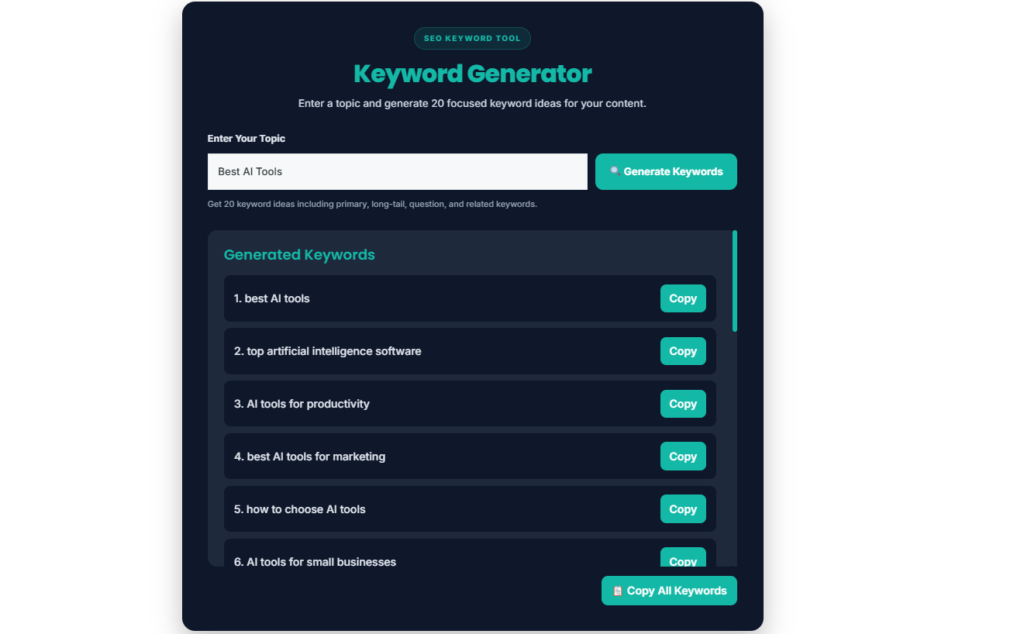
Using the tool itself is pretty straightforward. You don’t need to be an SEO expert, and you don’t need to know a bunch of technical terms before you start.
Step 1: Enter Your Topic
Start by entering the topic you want keyword ideas for. For example, you could enter “make money with AI.”
Try to be clear about what you’re researching. If you’re planning an article about AI tools for students, enter something close to that instead of entering only “AI.”
Step 2: Click Generate Keywords
Once your topic is in the box, click Generate Keywords.
The tool will process your topic and create the keyword suggestions. You don’t need to add anything else.
Step 3: Look Through the 20 Ideas
You’ll get 20 keyword ideas based on your topic. Take a minute to read through them instead of immediately copying the whole list.
Look for phrases that sound like something your audience would actually search for.
Step 4: Pick the Useful Ones
Not every keyword will be right for every article. That’s completely fine.
If you’re writing about AI tools for students, for example, a keyword about AI tools for large businesses probably isn’t going to help much. Choose the phrases that match your article and the people you’re trying to reach.
Step 5: Build Your Content Around the Topic
Now you can use your selected keywords to help plan your content. Think about what someone searching each phrase actually wants to know, and then make sure your article gives them a useful answer.
This is where search intent becomes important. A keyword can give you the words, but you still need to understand the reason behind the search.
Search Intent: The Part You Shouldn’t Ignore
Search intent simply means what someone is trying to find when they search something.
For example, someone searching “how to use ChatGPT for blogging” is probably looking for a guide or tutorial. Someone searching “best AI writing tools” may be looking for a list or comparison.
The words are different because the person’s goal is different.
Before you start writing around a keyword, search it on Google yourself. Look at the results and see what kind of pages are showing up. This can give you a quick idea of what Google thinks people want from that search.
You don’t have to copy those pages. You’re just trying to understand the search better.
One Topic Can Give You Many Content Ideas
Here’s one of my favorite things about keyword research.
You can start with one simple topic and end up with several article ideas.
Let’s say your starting topic is make money with AI. Your keyword research might give you ideas such as “AI side hustles,” “how to make money with AI,” “AI jobs for beginners,” and “best AI tools for making money.”
Those aren’t just keywords anymore. They’re possible topics.
You could use one as your main article and save the others for future posts. This is especially helpful if you’re trying to build a blog around a specific subject and don’t want to run out of things to write about.
How to Choose the Right Keywords
Getting a list of keywords is one thing. Knowing which ones are actually useful is another.
Start with relevance. Does the keyword match your topic? If it doesn’t, there’s not much reason to target it. Then think about the person searching it. What are they hoping to find when they type those words into Google?
Specificity can help too. A phrase like “SEO” is extremely broad. Something like “SEO tips for new bloggers“ gives you a much clearer idea of what the searcher wants.
And don’t forget about your own website. A keyword might look great on paper, but if you don’t have anything useful to say about it, it may not be the right choice for you.
Use Google Trends When You Want More Information
Once you’ve generated some keyword ideas, you can take your research one step further with Google Trends.
Google Trends lets you compare search interest over time and see how interest in a topic changes. This can be useful when you’re deciding between two similar topics or trying to figure out whether a topic is becoming more popular.
You don’t need to spend hours studying charts. Sometimes a quick look is enough to notice that one topic is getting more attention than another.
Just remember that Trends shows search interest, not a simple promise of how much traffic you’ll get.
AI Keyword Research vs. Doing Everything Manually
There is nothing wrong with manual keyword research. You can search Google, check related searches, look at competing pages, explore questions, and write down ideas yourself.
The problem is that it can take a while, especially when you’re starting from scratch.
That’s where an AI tool can be useful. You can enter one topic and get 20 ideas in a few seconds. Then, instead of spending all your time trying to come up with ideas, you can spend that time checking the ones that actually look useful.
I wouldn’t use AI as a replacement for your own research. I’d use it as a faster starting point.
Common Keyword Research Mistakes
Choosing Keywords That Don’t Match Your Topic
This is an easy mistake to make when you have a long list of ideas. A keyword might look interesting, but if it has little to do with your article, leave it out.
Your keyword and your content should make sense together.
Only Looking at Short Keywords
Don’t assume that shorter keywords are always better. A specific phrase can sometimes give you a much clearer idea of what the reader wants.
For example, “AI tools“ is broad, while “best AI tools for freelance writers” gives you a much more specific direction.
Ignoring Search Intent
Don’t just look at the words in a keyword. Think about the person behind the search.
If they want a tutorial, give them a tutorial. If they want a comparison, give them a comparison. The better your content matches the reason behind the search, the more useful it becomes.
Stuffing Keywords Into Your Article
You don’t need to repeat your main keyword every few sentences. That usually makes writing feel forced and can make the article annoying to read.
Use your keyword where it naturally belongs. Then focus on explaining the topic clearly.
Using AI Suggestions Without Checking Them
AI can give you a great starting list, but you should still review the results. Some ideas may be too broad, too similar, or simply not useful for your audience.
A few minutes of checking can save you from building an entire article around the wrong idea.
How Keyword Research Can Help With YouTube
Keyword research isn’t only useful for Google.
It can also help when you’re planning YouTube videos. If you find a topic that people are interested in, you can turn that topic into a video and then work on the title.
For example, if your research points you toward AI tools for beginners, you could create a video around that topic and then use our AI YouTube Title Generator to come up with different title ideas.
So the process can be pretty simple: find a topic, research some keywords, create the content, and then work on a title that makes people want to click.
Frequently Asked Questions
What is a keyword in SEO?
A keyword is a word or phrase that someone types into a search engine. Bloggers and website owners use keyword research to understand what people are looking for and to plan content around those topics.
What is a long-tail keyword?
A long-tail keyword is a longer and more specific search phrase. For example, “free AI keyword generator for bloggers” is more specific than “keyword generator.”
How many keywords should I use in a blog post?
There isn’t a magic number. Start with the main topic and use relevant keywords where they fit naturally. You don’t need to force dozens of keywords into one article.
Can AI-generated keywords help with SEO?
Yes, AI can help you find ideas much faster. But the suggestions should be treated as a starting point. Check the keywords, look at the search results, and make sure they fit your audience before using them.
Should I use all 20 keywords from the generator?
No. The tool gives you ideas, not a list of keywords that you must use. Pick the ones that match your topic and save the others for future content if they look useful.
Can keyword research help with YouTube?
Yes. Keyword research can help you find topics and questions that people are searching for. Once you have a good topic, you can use your AI YouTube Title Generator to work on possible video titles.
One Last Thing You Should Know.
Keyword research doesn’t have to be a huge SEO project. Start with one clear topic, find some useful search phrases, and then spend a little time understanding what people actually want from those searches.
That’s what our AI Keyword Generator is designed to help with. Enter your topic, and you’ll get 20 keyword ideas that you can review, copy, and use as a starting point for your content.
Just don’t stop at the generated list. Search a few of the ideas yourself, check the results, look at search intent, and think about what would actually help your reader. The tool can give you the ideas, but you decide what to do with them.